If Tellfy notifications are not coming to you on Huawei devices, it may be because the device’s own power options are blocking them.
We have observed that in some Huawei P20, P20 Lite or Huawei Honor phones, with Android 8 Oreo, this behavior is happening. For them to work, you must follow the following steps:
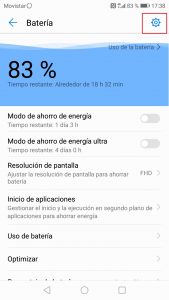
1. Access the Settings option of your device and then the Battery option.
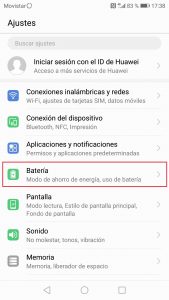
2. In the Battery section, access the Start application option
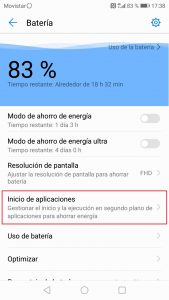
3. A list will appear with all the applications that you have installed on the device. You have to browse the list until you find the Tellfy application. Once we have located it, we will deactivate the option to Manage Automatically.
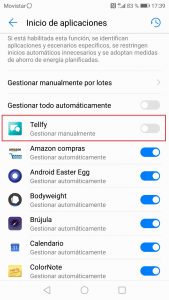
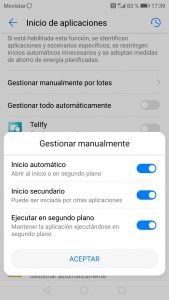
4. When deactivating the automatic management option, a panel will appear where we can select several options. We will ensure that all the options that appear are active, including Auto Start, Secondary Start and Run in background.
5. Finally we will make sure that the device is allowed to use data when it is at rest. To do this we return to the Battery menu and click on the icon located in the upper right area of the screen.
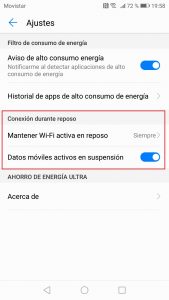
6. In the new screen that appears, make sure that the option Keep Wi-Fi active at rest is marked Always and Mobile Data in suspension is active also, as shown in the following image.
7. Finally, let’s start the Tellfy application so that the system adjusts the settings we have established. Now when you restart the device again or close the Tellfy application, notifications should arrive.
8. If you still do not receive notifications, we suggest you also check the following:
- That you do not have the Community or the Groups where the communications are arriving silenced.
- Do not have an energy management application installed that is blocking notifications, such as Clean Master. In this case you have to go to the configuration of this application and add Tellfy to the list of priority applications.
9. If after following these steps the notifications still do not work for you, contact us so that we can personally treat your case and resolve it. Fill out the form you will find in Contact and we will contact you as soon as possible.